Don't learn another tool. Just tell your AI.
Other countdown tools bolt a chatbot into their app. SureFire Deadlines plugs straight into the AI you already use, Claude or ChatGPT, so it can build your campaign, write your emails, change your deadline and tell you what's selling, all from one conversation.
- Works with Claude and ChatGPT
- Set up in about a minute
- No code, no API keys to copy
Four jobs your AI does for you
With the SureFire Deadlines connector and Skill, your AI knows how deadline marketing works and can actually do the work inside your account.
The campaign builder
Describe your offer in plain English. It picks the right kind of deadline (evergreen, launch, flash sale, Black Friday, limited spots), sets the dates and time zone, adds your pages and "time's up" action, and hands you the codes for your email platform.
"Set up an evergreen offer: 72 hours from their first click, for my course at mysite.com/offer. I use Kit."
The email writer
It writes your whole promo sequence (launch, holiday sale or evergreen welcome series) with the live timer and smart link already in the right places, in your voice.
"Write my 5 Black Friday emails and put the timer and smart link in each one."
The promo planner
Paste in your sales page or offer and it plans the promotion around your deadline: what to send and when, a caption for every day on Instagram, TikTok and YouTube, and the countdown clips to post.
"Plan my 12 Days of Deals and give me a caption for each day."
The deadline manager
It watches your numbers and makes changes on command: extend by 24 hours, end it now, look up when one subscriber's offer ends, or start someone's deadline by hand.
"How many people opened the timer this week, and how many bought? Selling well? Extend it a day."
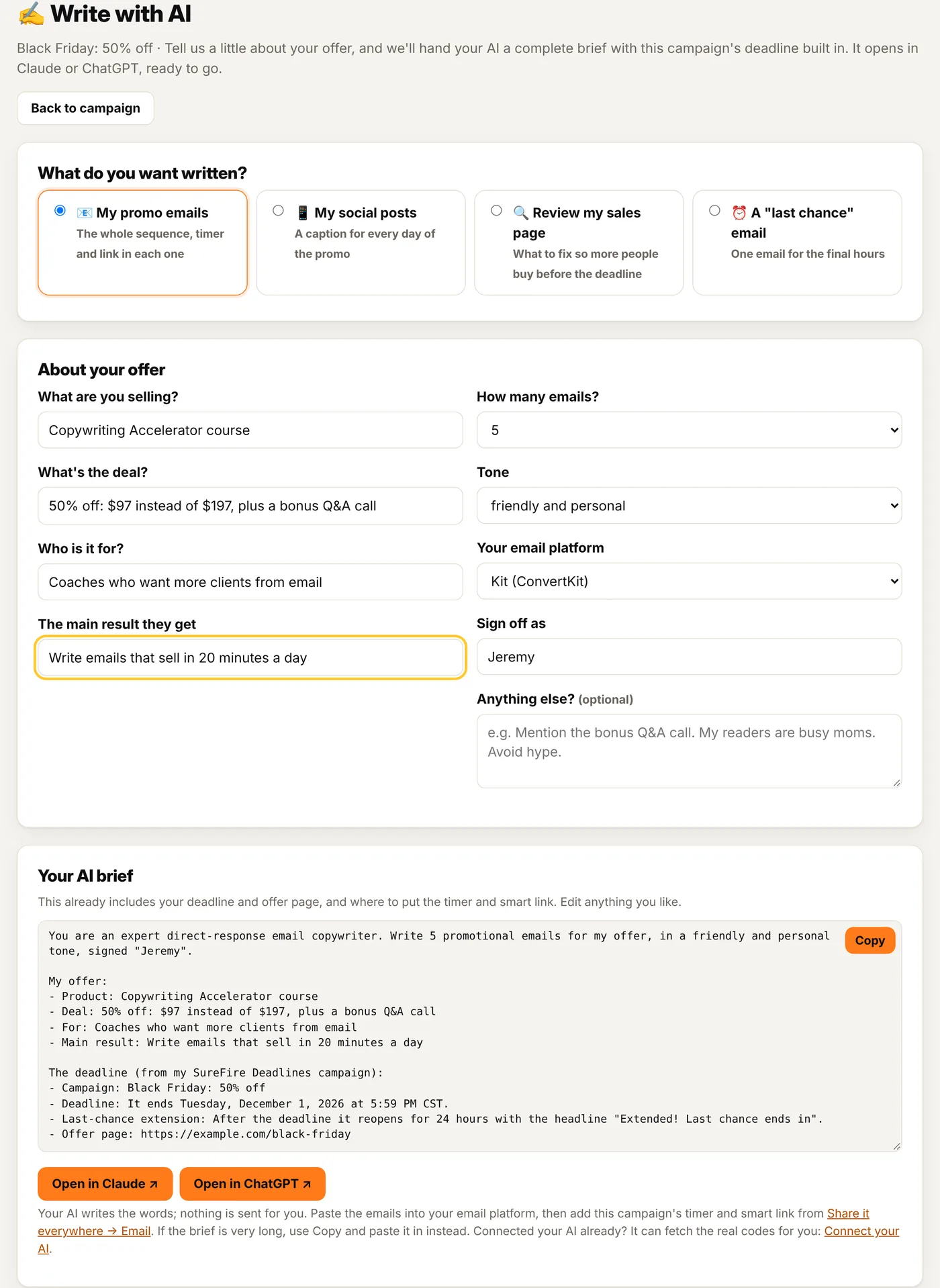
✍️ Write with AI, on every campaign
Every campaign has a Write with AI button. Answer four quick questions about your offer and we build a complete brief for your AI, with your deadline, offer page and timer placement already in it.
- Your promo emails: the whole sequence, in your tone, timed to your deadline.
- Your social posts: a caption for every day, plus video hook ideas.
- A "last chance" email for the final hours, with three subject lines.
- A sales page review: section by section, with rewritten copy and where to put your timers.
- One click opens it in Claude or ChatGPT. You stay in control: it writes, you decide what to send.
One conversation. A whole promotion.
This is what running a promo looks like when your AI is connected. No dashboards to learn, no codes to hunt for.
- Your AI creates real campaigns in your account, not mock-ups.
- Every change it makes updates every email, page, post and live stream at once.
- You stay in charge: it only acts when you ask, and you can see everything in your account.
Example conversation with sample numbers.
Connected in about a minute
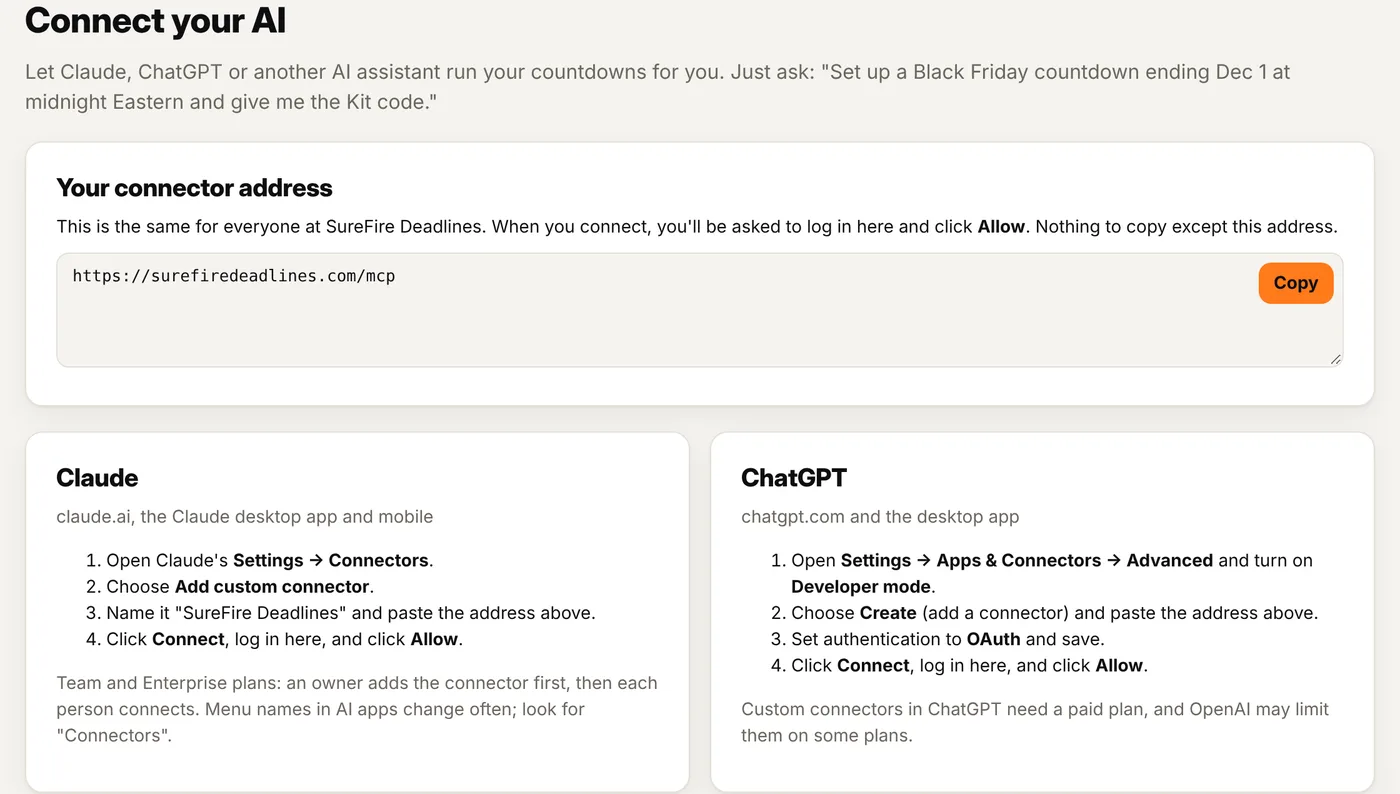
SureFire Deadlines speaks MCP (Model Context Protocol), the open standard Claude, ChatGPT and AI developer tools use to connect to apps. You don't need to know any of that. You just paste one address.
Copy one address
It's on the AI page in your account. Nothing secret to copy.
Paste it in your AI
Claude: Settings → Connectors. ChatGPT: Settings → Apps & Connectors.
Log in and click Allow
Your AI can now see and run your campaigns. Disconnect any time.
Just ask
"Set up my Black Friday promo." "Extend it 24 hours." "What sold today?"
Five ways AI works for you
The AI connector (MCP)
15 tools your AI can use: create, update, extend and end campaigns; get the codes for any email platform; start, look up or extend one person's deadline; pull stats; get social clips and captions and schedule them to post automatically; and search the help guide.
The SureFire Deadlines Skill
A free download for Claude that teaches it deadline marketing: which deadline fits your offer, what goes where, and how to write the emails. Pair it with the connector and Claude plans and runs the promo.
Write with AI
On every campaign: your emails, captions, a last-chance email or a sales page review, with your deadline built in. Opens in Claude or ChatGPT in one click.

Dash, your AI setup coach
Built into every page of your account. Stuck? Ask in plain English and get the exact steps for your campaign. No setup and no AI account needed.
For developers
Use it from Claude Code, Cursor, Windsurf or any MCP client with an API token, or call the REST API directly.
A chatbot in an app vs. an AI that runs your app
| A chatbot inside a countdown tool | SureFire Deadlines + your AI | |
|---|---|---|
| Where you talk to it | Only inside their app | ✓ In Claude or ChatGPT, where you already work |
| Knows your other work: your offer docs, your voice, your past emails | ✕ Starts from zero | ✓ Uses the docs, notes and past emails you share with it |
| Works with your other connected apps in the same chat | ✕ | ✓ Docs, email, calendar and more |
| Gets smarter as AI models improve | When they update it | ✓ Every time Claude or ChatGPT improves |
Things to ask your AI
Let your AI run your next deadline
Founders pricing ends Cyber Monday at midnight. Every AI feature is included in every plan.
Lock in Founders pricing + 10% off →